
Error creating executable files with cx_Freeze
Introduction
As we all know, Python is a general-purpose language in which you can build different types of applications in a very friendly, clean and explicit syntax. Recently I was playing again with the library for creating graphical applications, called PyQt (a Python wrapper for Qt, the famous C++ library), I made something very simple, a small calculator, which you can see in the next link. I won’t lie to you, I really liked how it turned out, so much so that I decided to make an executable to show it to my friends. It was not the first time I had generated an executable for a graphical application in Python, so I felt confident, of course this time I was using Python 3.4 (previously I had used 2.x versions of the language), so while researching I found a library called cx_Freeze, this was where I had to break my head a little, since it was not going to be as easy as the first times.
The Problem
I assume that you have already installed cx_Frezee on your machine and that you have Python and pip configured, it should be added that I have a 32-bit Windows 7 Ultimate (yes, I code in Python using Windows…). Next, you must create a file at the same level as your main file (from where you run the application in my case it is main.py), give it any name, I will give it exe.py. Below I show you my file structure.

Open exe.py and enter the following:
import sys
from cx_Freeze import setup, Executable

#If the platform is Windows, you set base to "Win32GUI", since the executable files with cx_Freeze are built
 #default for console applications, so base will ALWAYS be set to 'Console',
 #Unless we have this condition.
if sys.platform == "win32":
    base="Win32GUI"

executables = [Executable(
	"main.pyw", #This is my main file, the one that starts with the execution of my app
	base = base, #If it doesn't work, try base = "Win32GUI"
	targetName = "Vibora.exe", #The name you want your executable to have
	)]

setup(
	name = "Vibora",#The name of your application
	version = "2.0",
	options = {
		"build_exe":{
			"include_files":["images/"]}#If your application needs images, sounds or fonts, include them here
		},
	executables = executables
)
The lines that I consider are important, I have commented on them, anyway in the cx_Freeze documentation you can see a lot of variables that you can use to configure the executable that you will generate.
Open your cmd, go to the root of your application, and run python.exe exe.py build, this command will build a folder with the name build, inside it you will find a second folder, open it and you will be able to see what has been generated, your executable file should be there.
Very good, double click on the file. Something macabre and scary has happened, we have an error: AttributeError 'module' object has no attribute '_fix_up_module', but don’t worry, we’re going to solve it.
Solution
The error consists of a bug that the library has when working on Windows, what you should do is go to this site, and download a file with a .whl extension, but which one? If you have Python 3.4 installed, as is my case, you must download cx_Freeze-4.3.4-cp34-none-win32.whl. If you have another distribution installed, look at the number after cp, I will show it to you in an image:
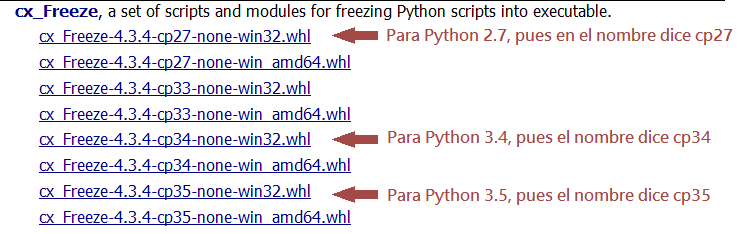
As I mentioned before, my machine is 32-bit, if yours is 64-bit, download either the 64-bit file or the 32-bit one, it will work for both.
When you have downloaded it, open your cmd and place pip install file_name.whl, where file_name.whl will be the file that you have previously downloaded. Wait for it to run, what it will do is compile from .whl to .py and fix the bug that the library presents. With this, repeat the steps to generate the executable, you know: python.exe exe.py build inside your application directory. And voila, error solved!
I hope you can now generate your executable files and brag a little to your friends, if you have any questions on any of the steps above you can always comment. Not being more, see you in a next post.
print("See you soon")Translated using GPT 5.3 Codex