
The Library, application in Django 1.8 | Part VI
- The Library, application in Django 1.8 | Part I
- The Library, application in Django 1.8 | Part II
- The Library, application in Django 1.8 | Part III
- The Library, application in Django 1.8 | Part IV
- The Library, application in Django 1.8 | Part V
- The Library, application in Django 1.8 | Part VI
- The Library, application in Django 1.8 | Part VII
Introduction
Today we are going to continue with the sixth part of the creation of the Library, an intermediate level Django application, in the previous installment we made two views, one to obtain all the books present in the database and another for the details of each book, with its corresponding templates and url mappings. Today we are going to talk about two very interesting features of this framework: Generic views and template inheritance.
Generic views
When Django was created, the framework development team did not want to strictly adhere to a specific architecture (although we all know that its architecture is a variant of the MVC pattern), they wanted to create a framework that would avoid many of the common tasks that any web application has, such as: creating, updating, deleting and deleting records from a database table regardless of their relationships. The goal was for the developer to focus on implementing the specific behavior of the application and not waste a lot of time on secondary things. This is how generic views were born.
Template inheritance
The Django template engine provides us with a very useful feature, we can define general templates that will have common html elements from all the others, thus allowing us not to repeat html code and saving us some headaches. Maybe you want to make a general template where you place the code for your menu bar and perhaps a footer. This way you would only have to define the content of specific templates, without repeating menu or footer code in them.
Using generic views in our app
It’s time to use what we have learned in our application, first let’s go with the generic views.
Open the views.py file present within the site/library folder and place the following
#...another imports
#we import generic Django views to create, update and delete
from django.views.generic.edit import CreateView, UpdateView, DeleteView
from library.forms import FormCrearBook #then we will see why
from django.core.urlresolvers import reverse_lazy

#...another views
#...

#--------------------------Generic views-----------------------
class BookCreateView(CreateView):
	"""With this generic view, we have the logic
	to create a new Book"""
	model = Book
	#Special features for the way to create
	form_class = FormCreateBook
	template_name = 'library/uc_book.html'

class BookUpdateView(UpdateView):
	"""This view allows us to update an existing Book"""
	model = Book
	form_class = FormCreateBook
	template_name = 'library/uc_book.html'


class BookDeleteView(DeleteView):
	"""This view will allow us to delete an existing Book"""
	model = Book
	success_url = reverse_lazy('site:index')
Things to say here:
-
We have defined three generic views, to create, update and delete Books.
-
LibroCreateView inherits from the CreateView class, which provides us with attributes and behaviors to perform the create action, the model variable of all views refers to the model in which the action will be performed as appropriate (create, delete, update). We do not have to worry about SQL queries and other details so that the actions are reflected in the DB.
-
As we said in the previous post, a view must return an HttpResponse object, which is roughly the template associated with the view. Thanks to the variable template_name we can specify which template returns the generic view.
-
For the create and update view we use the same template, Django is responsible for providing us with the appropriate behavior depending on each case.
-
For the last generic view (BookDeleteView), the success_url variable allows us to set the path where we will be sent right after deleting a book. We can access the data of a Book from the template through a variable, which will be the name of the model in lower case, in our case it will be
book.
The form_class variable present in the creation and update views refers to how the update and create forms will be built; It is already known that to create a Book we need a name field, another author field, an editor field, among others (the fields that we defined in the Book model). We need to provide the generic view with the necessary information so that it can build the appropriate form, for this we must use the Django forms API.
inside the site/library folder create a new file, we will call it forms.py, in it place the following:
#we import the forms api from django
from django import forms
from django.forms import ModelForm

#We import the models, for now only Book
from library.models import Book

class FormCreateBook(forms.ModelForm):
	"""Class to create a form
	from a defined model"""
    class Goal:
    	"""Internal class, here we define the necessary information:
    	1. What model is the form to be built (model variable)
    	2. what fields will the form have (fields variable)"""
        model = Book
    	fields = ['title', 'authors', 'editor', 'publication_date', 'cover', 'synopsis']
The next thing we are going to do is create in the library/templates/library folder a new template called uc_libro.html that will be used by two of the generic views made previously, inside it place the following:
<form action="" enctype="multipart/form-data" method="POST">
	{% csrf_token %}
	<table>
		{{ form.as_table }}
	</table>
	<button type="submit" name="create" value="create">Submit</button>
</form>
Things to say up to here:
-
The previous template will be used by the LibroCreateView and LibroUpdateView views to manage the book creation and update actions.
-
the form created in our
forms.pyfile comes in html code form in the form variable, that variable is the one we see in the previous template. There are several ways to display that form, we have chosen to display it as a table, that’s why we made form.as_table. -
the csrf_token tag must be included whenever we are going to update or create records in the database, this protects us against CSRF attacks
Well, we have the template for the first two generic views but we are still missing something, a second template for the LibroDeleteView view. When we use this generic view, we must provide a confirmation template, Django tells us so. The name that said view should receive is modelo_confirm_delete, where model refers to the name of the model of the item to be deleted. As in our case we are going to delete books, then that template must have the name libro_confirm_delete.html. In that template place the following:
<form action="" method="POST">{% csrf_token %}
	<p>Do you want to delete the book {{ book.title }}?</p>
	<div>
		<button type="submit">Confirm</button>
		<a href="{% url 'site:index' %}">Cancel</a>
	</div>
</form>
The previous template is confirmation, if the user clicks on the confirm button, then he will be directed to a template whose name will be index and the book will be deleted, while if he clicks on cancel he will be taken to the index without the book being deleted, for this we use a url tag; ‘sito:index’ refers to the entire url of the index, it is like concatenating the url whose namespace is “site” with the url whose name is “index”. Thanks to the context given by the generic view, we access the data of a Book, using the variable book, you can think of that variable as a Book object.
Finally we must associate the views with the urls, so that everything works perfectly, open the file sitiolectura/library/urls.py and place the following
from django.conf.urls import include, url
#We tell Django to import the views file from this directory
from . import views

urlpatterns = [
	#index, show all books
    url( r'^$' , views.books, name='index' ),
    #Detail of a particular book
    url(r'^books/(\d+)/$', views.detail_book, name='detail-book'),
    #Create books
	url(r'^create-book$', views.BookCreateView.as_view(), name='create'),
	#Update Books
	url(r'^(?P<pk>\d+)/update-book$', views.BookUpdateView.as_view(), name='update'),
	#Delete Books
	url(r'^(?P<pk>\d+)/delete-book$', views.BookDeleteView.as_view(), name='delete'),
]
Things to say here:
-
As we know, views are methods or functions, although if you have paid attention you have been able to see that generic views are python classes; Django calls this class-based views. But there must be a way to “pass” those classes to an equivalent in functions, for that we use the
as_view()method. -
The index of our application will now show the list of books in the database.
How about we try everything?
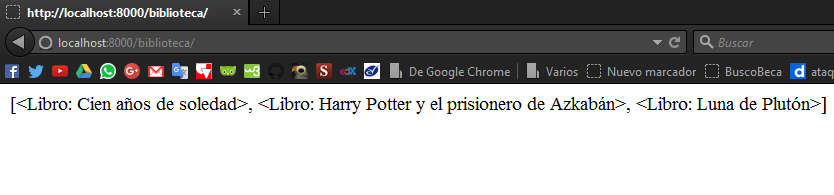
- If you put
localhost:8000/library/in the browser you should see the list of all the books in the database
- To create a new book we go to
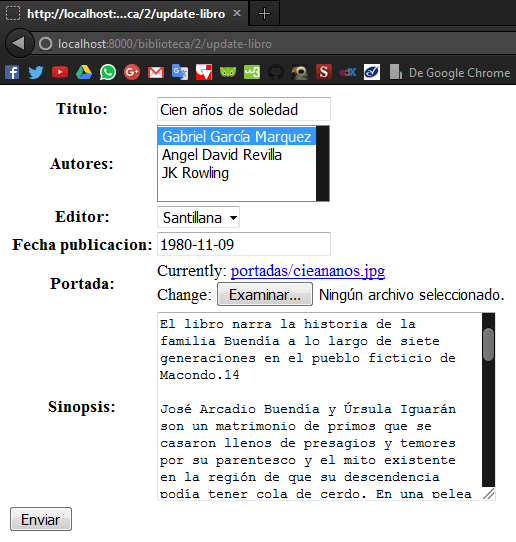
localhost:8000/library/create-bookyou should see the book creation form, Django knows that an attribute manyToMany like Authors will be a list of multiple options (you can choose more than one author for the same book), and that an attribute that is primaryKey will be translated into a drop-down list, as is the case with Editor.

- Now we are going to edit an existing book, let’s say book 2, go to
localhost:8000/library/2/update-bookyou should see the form with the current data of book 2, ready to be edited
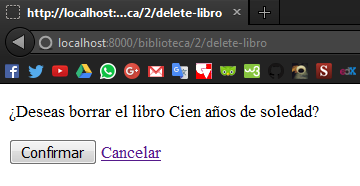
- The last thing is to try deleting books, let’s say book 2, go to
localhost:8000/library/2/delete-book, you should be directed to a confirmation template.
- Click accept and you should be redirected to the index, where you can verify that the book has been deleted. In my case, book 2 is One Hundred Years of Solitude, and in the image you can see that it has already been deleted.

Well, that’s all, we have done a simple CRUD with the help of Django’s generic views, I invite you to read the forms API documentation, since we don’t talk much about this topic in the posts. The only thing left for us to finish our library is to make use of template inheritance, that will be a topic for another post, if you have questions you can leave them in the comments. Not being more, we’ll see each other another time.
print("See you soon")Translated using GPT 5.3 Codex